
You invested a lot of money in creating your latest website. You might even say it was a labor of love (and probably some frustration, too). But now you’ve been hearing more and more about web accessibility, maybe even some horror stories from friends who have had their companies sued for non-compliance. How do you even begin to address this issue?
With updated accessibility legal requirements for schools and other organizations, you don’t have much choice but to have an accessible website. But I’ve got good news for you. Even if you don’t know what WCAG or POUR means, you can get your website compliant through web accessibility remediation.
Remediation isn’t a “fix,” but it’s the process of optimizing your website. And no, it doesn’t always include developing a whole new one. Bonus points: improving your web accessibility helps everyone, not just the 27% of people with a disability.
In this article, we’re going to take you through the regular process of web accessibility remediation, why it always starts with an audit, and how this investment pays off.
Table of Contents
What is Web Accessibility Remediation?
Someone’s reached out and told you that you need to fix accessibility issues on your website. Either you’re worried about Title II Part H of the ADA (even though it’s been extended a year), or you’ve been hearing too much about legal troubles. When you start researching, you find a bunch of people offering “web accessibility remediation.”
What actually is that?
It’s simple. Your website may not be fully accessible, but it may not need to be rebuilt to get compliant. Web accessibility remediation is the process of fixing issues in your website to help you meet WCAG standards.
These optimizations can range from quick, easy fixes to a massive overhaul in your website’s structure. Believe me, we’ve seen both types repeatedly.
Meeting WCAG Standards
Internationally, we recognize the Web Content Accessibility Guidelines, or WCAG, as what we need to meet in order to have an accessible website.
While WCAG is currently on version 2.2 (and working on 3), most international laws require we meet version 2.1 level AA. This gives organizations a bit of leeway to catch up.
To give you an idea of what you’re looking at needing to change, some of the basics of 2.1 Level AA include:
- Images have descriptive alternative text tags (ALT)
- Captions for video content
- Transcripts for audio content
- Readable color contrasts
- Websites are navigable with keyboards
- Animations don’t have more than 3 flashes per second
- Animations are pausable
- Your copy is readable
What We Look at in Remediation
If we’re aiming to meet WCAG 2.1 Level AA standards, we need to review a few things on your website. In any remediation process, we’re going to test your design, the way your website is coded, and even the content of your website. The copy, videos, and even PDFs your team creates daily can have a significant impact on whether your site is accessible.
Remediation Starts with an Audit
I’ve had a few clients ask me over the years why we can’t just start fixing their websites. The truth? If you want to save time and money on your web accessibility remediation, we always need to start with an audit.
Without a web accessibility audit, it’s hard to know what exactly is wrong with your website. We could find during the audit process that you’re not that far off after all! Or we could find that you’ve got a lot of work to do (remember how I said it’s almost never in the middle?).
Most (half-decent) websites are built with a lot of similar pieces throughout. When we find an issue on your homepage, that same issue probably exists in multiple pages of your website. Identifying these patterns helps us to save a ton of time while we fix your website.
An accessibility audit acts a bit like our roadmap for the remediation process. First, we identify the issues, then we get to work.
If you’d like to know more about how the audit process works, we previously broke down what to expect in a web accessibility audit.
Once our audit is complete, we create a schedule to perform the optimizations you need. While we’d love to fix everything at once, that’s not always doable. Generally, web accessibility remediation starts with the most urgent issues, then works through a list in priority order.
Common Accessibility Issues Fixed in Remediation
More often than not, when we run web accessibility audits, we find a lot of the same issues. Web design trends don’t help, but how your website is built may affect this as well. For instance, many of the premium drag-and-drop options will have very similar issues.
What kinds of issues might you expect as needs-to-be-fixed in your own web accessibility remediation?
Let’s break down the usual suspects.
Visual Barriers
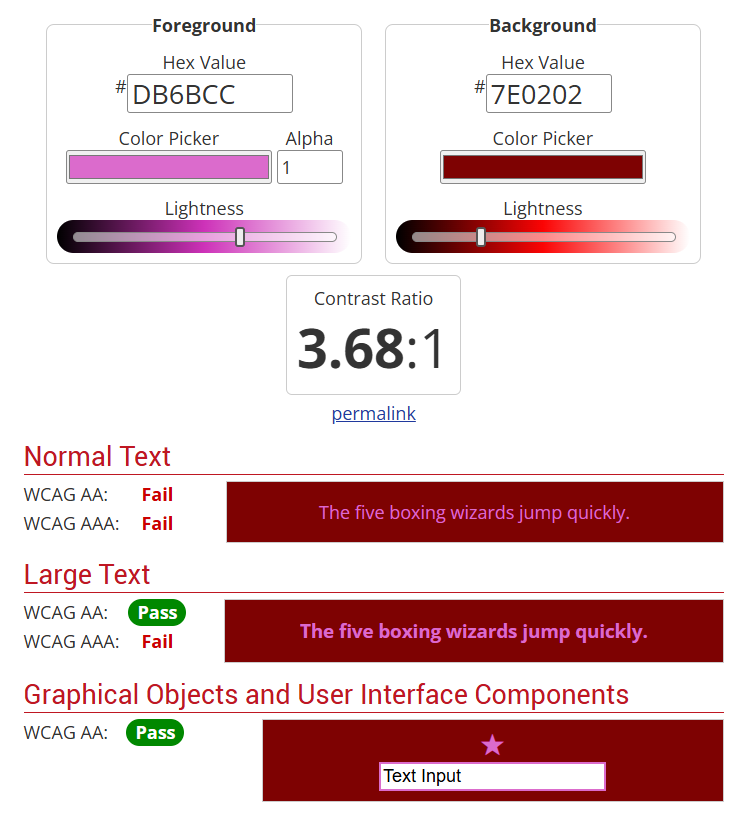
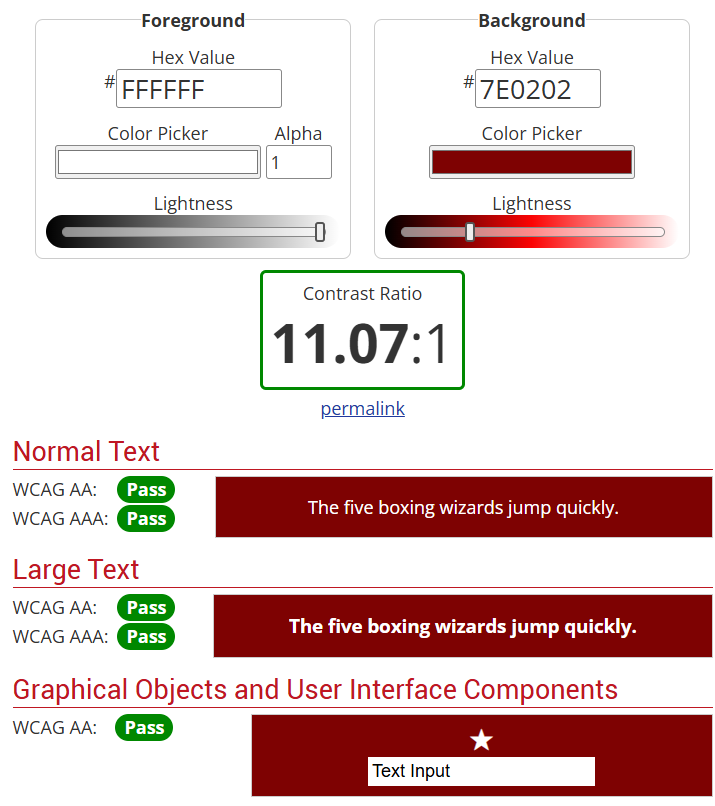
Perhaps the most common problem I’m seeing lately? Poor color contrast.
It’s really popular on websites and even on social media to use bright colors in your designs. But are these colors readable?
Most designers don’t know they need to be checking color contrast. This means that the background color on your website needs to have a contrast ratio of at least 4.5:1 with the font color to be readable. Think, avoiding pink text on a red background and opting for white text instead.
Another big mistake I see is attempting to lay text directly on an image. Given that images often have variable colors and patterns, this can be nearly impossible to read.
Navigation Barriers
Have you ever attempted to navigate through your website with only your keyboard? Can you do it without going through every single item on your menu? Can you still submit the forms you need to?
Too often, we neglect users who need assistive technologies and focus only on those who use a mouse or a finger to navigate.
Your website should be navigable with the tab key and other keyboard shortcuts, and you should include a Skip to Content link so they can bypass the menu and get to what they need.
Structural Barriers
For blind and visually-impaired people, their web experience is drastically different than what you might understand. Many use screen readers that actually read the internet back to them. To use and get the full context of your website, there are a few key things we need to do.
One is that we need to add ALT text, or alternative text descriptions, to most of the images on our websites. ALT text should be a short description of what’s actually in the image. These descriptions are read back to customers using screen readers and provide vital context for why that image is there in the first place. Without it, they may have the image file name read to them or just not know there’s an image there at all.
Another common problem? Not having form labels. I see many designers pushing to remove the “ugly” label above a form input, like a name field, to achieve a “cleaner” look. Instead, they want the label to be within the input (really a placeholder). Why is this a problem? Because placeholders are currently not read by screen readers, so those users have no clue what they’re filling out without the label present.
Multimedia Barriers
We love videos these days, right? They allow us to reach people in a wholly new way and build trust. What many businesses forget is to include alternative ways to consume that video content.
Individuals with ADHD often have auditory processing issues, so transcripts can help them better follow along with videos and podcasts. Those with hearing impairments need the closed captions, or even someone signing in the corner, to get the context of your video.
You also want to be careful about instructing people to “pause and read” things in your video. This doesn’t work for blind individuals. Instead, read whatever it is out for them and make sure to describe any visuals you’re referencing within the script of the video.
Maybe my least favorite issue? The desire to use PDFs for everything. PDFs are notoriously inaccessible, and key optimization steps aren’t followed. If you can, anything in a PDF should really be on a website page instead. If you do NEED to use a PDF, take the time to make it accessible.
Web Accessibility ROI
This reads like a lot of work. It can be. But that investment comes with actual ROI.
Research shows that web accessibility has an average 100:1 return on investment. You can’t get that with anything else you do in your marketing.
Why is that ROI so huge? Because when your website is accessible, you’re tapping into 27% more of the market that you were actively excluding. Most WCAG standards align with SEO and UX best practices, too, so you’re not only improving your search engine rankings, but you’re also going to make conversions much easier.
Beyond improving your customer experience, you’re also signaling a commitment to social responsibility. People care about who they do business with. If you want to prove that you’re a kind, caring organization, you can’t just say it. You have to prove it with your actions, and web accessibility is honestly the bare minimum.
There is of course, the minimized legal risk as well. The average cost of an ADA settlement is far more expensive than remediation, and showing that you’re actively working to improve your website can have a web accessibility lawsuit dismissed.
Keeping Your Website Accessible
One thing to keep in mind with web accessibility remediation: this is not a one-and-done fix. Your website is constantly changing. Whether through content updates, new blog posts and news articles, or even your website platform, it’s not a static asset. Your website can be accessible one day and knocked out of compliance the next.
To keep your website accessible, you need to invest in training your team. Anyone who adds content to your website needs to know how to do so without injecting a bunch of accessibility errors the next time they add a blog post.
It’s also a great idea to set up a recurring check-up. While we recommend at least a quarterly check, you can do a bi-annual or even annual one to find any new issues and address them.
Whatever your remediation schedule, make sure to include in your website’s accessibility statement when you perform these checks. I’d also recommend you add a web accessibility feedback form. If someone finds an issue on your website, give them the ability to alert you so you can address it quickly. Both of these can help mitigate potential legal issues.
Web Accessibility is Good Business
Helping others use your website more easily isn’t just great ethics; it’s a good business practice.
With web accessibility remediation, you can minimize risk, expand your reach, and enhance your brand reputation. Kind of hard to say no to that, right?
If you’re ready to improve your website across the board, it might be time to invest in web accessibility remediation.
Let’s find the issues preventing browsers from becoming customers and make your website easy for everyone to use – no matter their abilities.